

Introduction
StatBar is a visual utility class used on a few components in the system. It generally represents things like Hp and Limits and is assigned on the Stat class.
The StatBar has a good looking visual animation for when the bar increases or decreases. Depending on whether there is an increase or decrease, one of the Image components will animate to match the other Image component which instantly reaches the target point.
Setting up
There is a prefab of StatBar in /Prefabs.
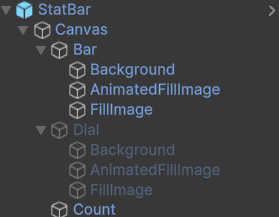
StatBars should either have a UI Billboard attached or be a child of one to maintain rotation with the Camera.
However if you wanted to set up this component yourself, simply add the StatBar component to gameobject. Create a World Canvas as a child, and then create your bars or dials as a child of the Canvas. Assign them in the StatBar component.
Settings
Fill Image
The Image component for the main ‘Front’ fill bar.
Animated Fill Image
The Image component ‘Behind’ the main Fill Image.
Use Text
If set, will update a text component will the Stat’s Current value using the Resource And Production Manager float precision.
Stat Text
Text Mesh Pro UGUI component that will update when the Stat changes.
Bg Fill Move Speed
How quickly does the Image component fill value keep up with the other Image component fill value.
Scripting
There are a couple of public methods available for StatBar below
/// <summary>
/// Refresh the StatBar with a Stat object
/// </summary>
/// <param name="stat">The Stat to use to refresh the StatBar</param>
public void UpdateStatBar(Stat stat)

/// <summary>
/// Refresh the StatBar with the relevent parameters
/// </summary>
/// <param name="current">The current fill value</param>
/// <param name="max">The max fill value</param>
/// <param name="previous">The previous value, this is used for the animated effect</param>
public void UpdateStatBar(float current, float max, float previous)