

Introduction
Items are Scriptable Objects that store an Items data for use throughout the system. They are mainly used in Resources and Blueprints but also internally used in ItemAmounts.
Setting up
There are some ready made Items in /Items in the root of the folder.
You can set up new Items with Create>ResourceAndProduction>Item.
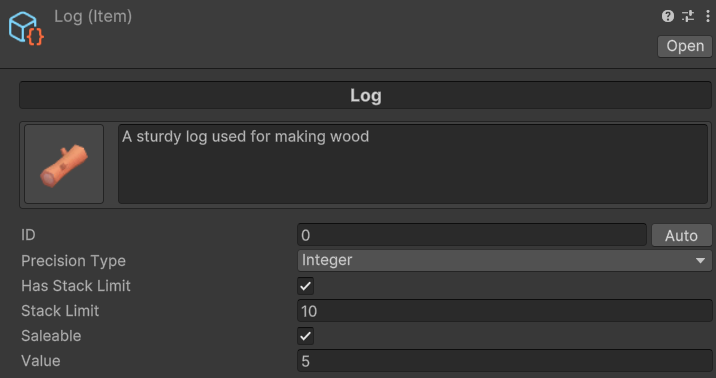
Settings
Name
The name can be entered directly in the top bar and will be used throughout the system.
Icon
The sprite used to display the Item. You can either click the Icon section on the top left to enter the selection screen or drag a sprite onto the slot.
Description
The description of the Item displayed in the ItemAmountInfoPanel in the Inventory.
ID
Self populating ID. Every duplicate or new Item created should assign a new unique ID for Item. Each Item needs a unique ID for the Items to be distinguished. You can click ‘Auto’ to assign the next unique one manually if there is an issue.
Precision Type
Integer – Items with this Precision Type can only be collected and used in whole integer units such as 1, 2 etc.
Float – Item with this Precision Type can be collected in floating point numbers such as 1.2, 1.5 etc. The floating point precision is a global setting set on the Resource And Production Manager component.
Has Stack Limit
Does this Item have a limit for how many can be put in one single stack before requiring another stack to be created.
Stack Limit
If Has Stack Limit is true, this setting will appear and you can assign how many Items of this type can be put in a single stack before requiring another to be created.
Saleable
Can this Item be sold in the ItemAmountInfoPanel screen?
Value
If this Item is Saleable, then how much is 1 unit worth?
Spawn Prefabs
If ResourceNode is using collect type as WorldCollect, which prefabs should be used. Prefabs need to have the WorldItem component attached.