

Introduction
This component acts as a physical pick up that can be collected from any player character.
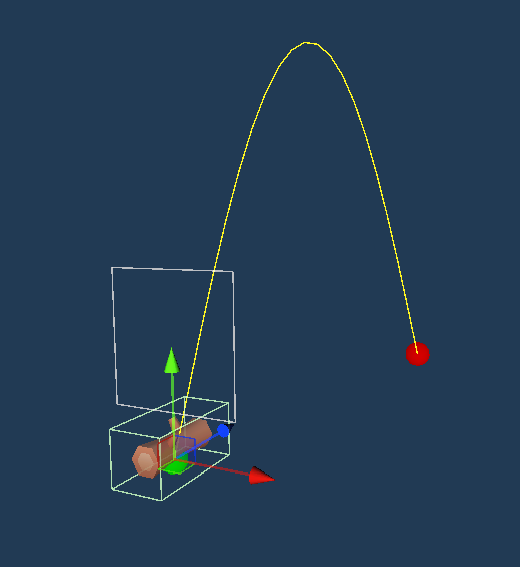
World Items are spawned from ResourceNodes and animate in an arc. Your playable character should have a layer than can be assigned in the settings of this component.
Setting up
There is a WorldItem prefab located in /prefabs. If you wanted to set this up yourself all you need is a mesh, a WorldItem component and a collider. You can set the arc of the animation via the settings.
In order to actually spawn World Items, a ResourceNode will need to have its collect type set to WorldCollect and the Item Scriptable Object will need to have one or more prefabs assigned to the list with this component on.
Settings
Arc Height
The maximum height the gameobject should reach when animating.
Arc Distance
How far the gameobject around the ResourceNode should reach when animating.
Distance Variation
The variation in the Arc Distance. A value of 0.5 will assign a random value to Arc Distance plus or minus this value and anywhere in between.
Animation Duration
How long it takes for the arc animation to complete.
Floor Offset
The Y offset that the WorldItem Gameobject will sit at when the animation has finished.
Rotate Speed
The speed in which the idle WorldItem will rotate at once the animation has finished.
Use 2D Axis
Uses the Z axis for arc height instead of Y and the XY axis for distance and direction instead XZ.
Draw Gizmos
Display the animation arc and landing point – take into account however this does not take into account the Distance Variation variable.
Extras
Adding a PopupSpawner to as a child to this component will enable popup spawning when the WorldItem is collected.
Event
On Item Collect
Triggers when clicked on in the world
Scripting
//Action
public Action<ItemAmount> OnItemCollect;

//Usage
if (worldItem != null)
{
    worldItem.OnItemCollect += (itemAmount) => StartCoroutine(SpawnPopup(itemAmount, true));
}