

Introduction
A Resource is unique to the Resource Node component and has its own property drawer setup. This setup involves how much and when this Resource will trigger and be given to the player.
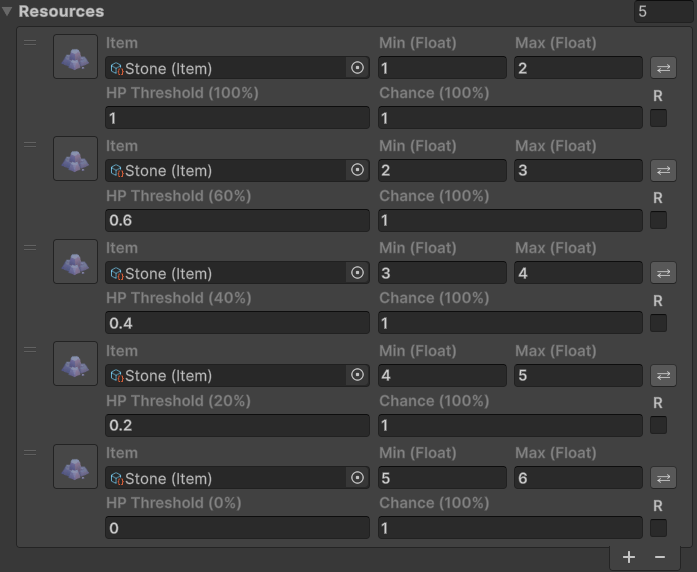
Setting up
To add a new resource, assign a new Resource to the Resources list on a Resource Node. This is done in the usual way by clicking the plus icon and can be deleted with the minus icon.
Settings
Item
The Item that will resource is and will use for int or float precision.
Amount OR Min Max
Only available to the HP Threshold Resource Trigger Type of Resource Node.
The small square button on the right hand side of the Resource is a toggle for using a fixed amount, or by assigning a range between two values at trigger time. These are also determined and clamped if the Item’s Precision Type is set to Integer.


Example output – 1 min and 3 min floats could return anywhere between those two values as floating point value (precision determined by the Resource And Production Manager global variable) while integer would only return 1, 2 or 3.
HpThreshold
Only available to the HP Threshold Resource Trigger Type of Resource Node.
What Threshold needs to be passed in order to trigger this Resource. This is a value between 0 and 1. A value of 1 means at 100% Hp, a Resource is triggered (in other words, on the first hit). A value of 0.5 means at 50% Hp, this Resource gets triggered.
Chance
How likely is this Resource to trigger. A value of 1 means the Resource will trigger 100% of the time, while a value of 0.5 means it will only trigger 50% of the time.
Recurring
This is a simple checkbox on the right hand side that decides if after the first trigger, should it keep triggering?