

Introduction
Item Containers are the flexible storage solution linking up to the Inventory Manager as a Global Storage solution if required.
They can be used singularly, or used in this combined method.
Setting up
There is a prefab for the Item Container located in /Prefabs/ItemContainer_Master.
If you wanted to set up from scratch, a couple of things to remember –
The parent should contain the Item Container component, with the Mesh with Collider (3d or 2d) attached as a child. Any other components you wish to add to the Item Container such as a StatBar for the Overall Capacity or a Popup Spawner should also be children of the Item Container gameobject.
It should look something like this.

Everything else is free to explore, and is best to try out which settings work for your game – see below for what each setting does.
Settings

Storage Type
All – Stores every type of Item available
ByType – Stores only the Items listed in Specific Item Types List. These will then be displayed as an icon above the Item Container.
Overall Container Limit Stat
The overall capacity of the container. This Sums all Item Amounts, to check against this Limit.
Stack Count Limit Stat
The Stack capacity of the container. If Items have a stack size set, then after that stack has reached its limit, then a new stack is created. The total stacks are checked against this Limit. You can think of stacks as slots in a container.
See below the two stacks, as the Log Item has a stack size of 10.

Include In Global Inventory
If true, this Item Container will be part of Global Storage solution provided by the Inventory Manager.
If false, this Item Container will act independently.
Priority
Priority will change which Item Container is chosen by the Inventory Manager during the selection in the Global Storage solution. Highest available is picked first.
Interact Behaviour
Click – Opens the Inventory window with only the Item Amounts in this Item Container.
Disabled – No interaction will occur with this Item Container.
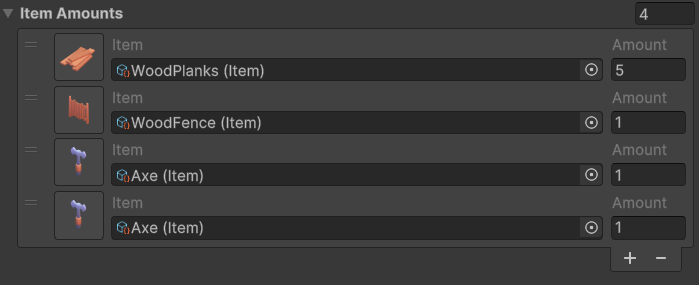
Item Amounts
This is the List of Item Amounts this Item Container is currently holding, split into stacks if applicable.
Note – This is generally meant for testing as it kept public, you can add things to this list in the inspector, and it will refresh on Start as long as the game is not loaded. If the game is loaded, everying put in from the inspector will be overwritten.
Events
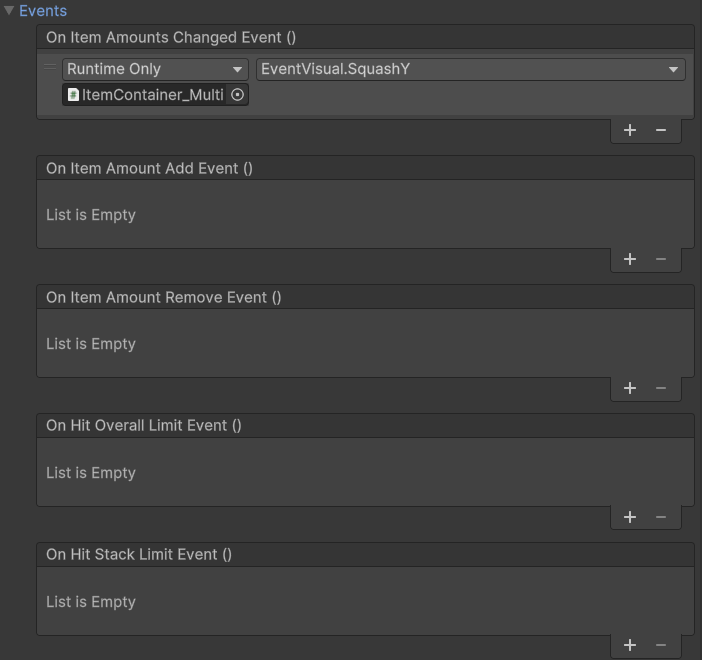
As with most of the core systems, there are key events you can hook into either via the editor, or via code.
On Item Amounts Changed Event
Triggers whenever there are any changes in the Item Container, whether added, or removed.
On Item Amount Add Event
Triggers when an Item Amount is added.
On Item Amount Remove Event
Triggers when an Item Amount is removed.
On Hit Overall Limit Event
Triggers when Overall Limit Stat is reached.
On Stack Limit Event
Triggers when Stack Limit Stat is reached.
Saving and Loading
All Item Containers that need saving must have the Saveable Object component added to it, which in turn will add a Unique ID component.
Check SaveManager to see how to do custom save and load back into your scene.
Only one list is saved for Item Containers, the ItemStackData list. This contains the itemID and the amount of the item stored. Any Item Containers placed during runtime ARE saved however because this asset does not do any building logic, you would need to first of all build this asset back into the world – then get its save data (see this section for more details on how to do this) and then finally reinstate the Item Container as saved.
Loading is fairly straght forward and will load the Item Amounts list exactly as saved. Destroyed Item Containers before saving will be completly reinstated if they were placed in the editor. As the asset has nothing to do with building – all destroyed Item Containers should be dealt with in how you define your placement/removal/loading logic. If placed in the editor, your loading logic could remove the gameobject if it was destroyed.
Extras
There are some nice complementary components for Item Container, such as the Event Visual, Popup Spawner, Stat Bar and Info Icon.
Any extras can be drag and dropped as child to this component’s gameobject. For super UI control, add a UI Billboard to Stat Bar and Info Icon, or use the prefab for both StatBarInfoIcon in /prefabs/UI.
Event Visual
Animates the component using public functions.
Popup Spawner
Displays a popup of the Item Amount that is added or removed from the inventory.
Stat Bar
Assigned to Item Container Overall Container Limit Stat in the left hand corner. Displays the Container storage space of the Item Container.
Info Icon
Displays either the Specific Item type of the container or the largest amount of Item in there.
Scripting
This section will cover scripting for developers wanting to hook into the system. Most public methods have a summary and info on what each parameter is for.
//Actions

//Triggers when there any changes to the Item Container, both adding and removing
public Action<ItemAmount, bool> OnItemAmountsChangedAction;

//Triggers when an ItemAmount is added
public Action<ItemAmount> OnItemAmountAddAction;

//Triggers when an ItemAmount is removed
//Note that this Action returns a COPY of the ItemAmount
//The actual ItemAmount has been removed and does not exist anymore
public Action<ItemAmount> OnItemAmountRemoveAction;

//Triggers when the OverallLimitStat is reached
public Action OnHitOverallLimitAction;

//Triggers when the StackLimitStat is reached
public Action OnHitStackLimitAction;

//Examples of how to set up the Actions
private void Start()
{
    itemContainer.OnItemAmountsChangedAction += (item, added) => DoSomething(item, added);
    itemContainer.OnItemAmountAddAction += (item) => DoSomething(item);
    itemContainer.OnItemAmountRemoveAction += (item) => DoSomething(item);
    itemContainer.OnHitOverallLimitAction += DoSomething();
    itemContainer.OnHitStackLimitAction += DoSomething();
}

/// <summary>
/// Use the ItemAmounts pre-added into the container to restart the container from there - will not do anything if the game is being loaded
/// </summary>
public void InitialiseState()

/// <summary>
/// Opens this individual ItemContainer in the InventoryManager UI, or if it currently open, close it
/// Will only work with interactWithMenusOpen bool set to true on InputManager
/// </summary>
public void OnClick()

/// <summary>
/// Add an ItemAmount to this ItemContainer within the storage constraints
/// </summary>
/// <param name="itemAmountToAdd">The ItemAmount, containing the item and the quantity</param>
/// <param name="overrideAmount">Optional value for the amount of itemAmountToAdd amount. This will override the amount if greater than 0</param>
/// <param name="updateOverallContainerLimitStat">Updates the overallContainerLimitStat by default, pass false to skip the update</param>
/// <returns>Remainder of not stored</returns>
public double AddItem(ItemAmount itemAmountToAdd, double overrideAmount = 0, bool updateOverallContainerLimitStat = true)

/// <summary>
/// Removes an ItemAmount from the container if it exists, over all stacks
/// </summary>
/// <param name="itemAmount">The ItemAmount to remove, uses the item._id to match so does not have to be the ItemAmount instance</param>
/// <param name="amount">Optional override amount to remove, otherwise uses itemAmount.Amount</param>
/// <returns>Whether any or all was removed</returns>
public bool RemoveItem(ItemAmount itemAmount, double amount = 0)

/// <summary>
/// Transfers all items from this container into another.
/// Will respect stack limits, container capacity, etc.
/// Leaves any untransferred items in the source container.
/// </summary>
public void TransferAllItemAmounts(ItemContainer targetContainer)

/// <summary>
/// Clears the ItemContainer
/// </summary>
public void RemoveAllItems()

/// <summary>
/// Makes several different checks to test if the container is full, or can accept a specified ItemAmount in full
/// </summary>
/// <param name="incoming">Can this Item Container fit this ItemAmount in full</param>
/// <returns>Whether the Item Container is full</returns>
public bool IsFull(ItemAmount incoming = null)

/// <summary>
/// Get the sum of all ItemAmounts in this ItemContainer
/// </summary>
/// <returns>The total number of ItemAmount.Amount</returns>
public double GetTotalItems()

/// <summary>
/// Get the ItemAmount from the given Item
/// </summary>
/// <param name="item">The Item to check for, uses the Item._id</param>
/// <returns>ItemAmount, or null if not found</returns>
public ItemAmount GetItemAmount(Item item)

/// <summary>
/// Get the ItemAmount from the given id
/// </summary>
/// <param name="id">The id of the Item to look for</param>
/// <returns>ItemAmount, or null if not found</returns>
public ItemAmount GetItemAmount(int id)

/// <summary>
/// Get the total amount of all of a certain ItemAmount.Item
/// </summary>
/// <param name="itemAmount">The ItemAmount for which the Item._id is checked</param>
/// <returns>The sum total of all of this type of Item</returns>
public double GetItemCount(ItemAmount itemAmount)

/// <summary>
/// Checks to see if the any of the incoming List<Item> have an id that matches any of the specificItemType id's. StorageType.All returns true.
/// </summary>
/// <param name="items">The Items List to check against</param>
/// <returns>Whether any of the Item._id matches any of the specificItemTypes</returns>
public bool DoItemTypesMatch(List<Item> items)

//Saving and Loading
public object CaptureState()
public void RestoreState(object state)